Track feedback: notes on your mix, in words you can act on
Drop or record a track, pick its genres, and read what its low end, drums, sidechain, stereo, key and loudness do, with the tool that fixes each note one click away. Free, in your browser.
English
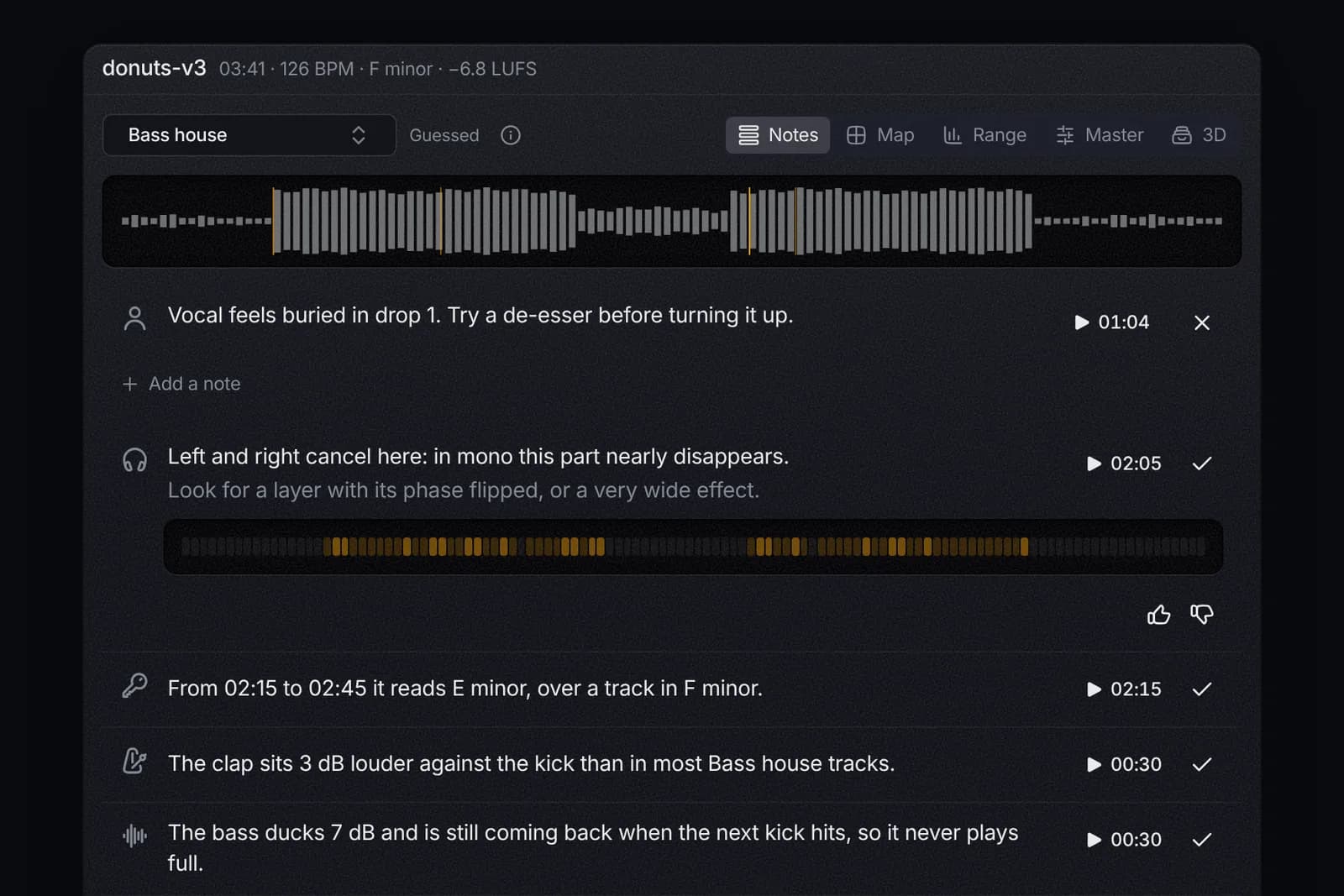
Track feedback reads a mix and tells you, in words, what it hears and what to change. Open tools.aden.space/feedback, drop a track or record it straight from your DAW, and pick the genres it should be heard through. You get notes on the low end, the balance, the drums, the sidechain, the stereo image, the key and the loudness, each one tied to the moment it is about. It is free, needs no account, and the file never leaves your browser.
Why words, and not a button that fixes it
Plenty of plugins listen to a mix and move it for you. You end up with a different mix and no idea why it is better, or whether it is. Track feedback goes the other way. It never touches your audio. It says what it measured ("the clap sits 3 dB louder against the kick than in most bass house tracks"), why that matters, and one way to change it. You decide, and next time you hear it yourself.
Every note also shows its picture: the reading against what is usual in the genre, and where in the track it happens. Press play on a note and you hear the exact moment.
What it listens for
- Low end and balance. How the track's power spreads over seven bands, from the sub to the air above 10 kHz, against what is usual in the genre, bar by bar.
- Drums. How loud the clap or snare sits against the kick, the hats against the kick, and how far the kick rises out of the bass (its punch). It also hears where the backbeat lands (on 2 and 4, or on 3 in half time) and how far the hats swing, so a UK garage beat that plays straight gets a note.
- Sidechain. How far the bass ducks after each kick, how soon it comes back, whether it is still ducked when the next kick hits, and whether the duck changes from kick to kick.
- Stereo. Whether the low end is stereo (it thins out on mono club systems and phones), whether left and right cancel anywhere, and how much level the track loses in mono.
- Key. The key over time, so a stretch that reads E minor over a track in F minor shows up as a clash. That is the classic out-of-key mashup, found for you.
- Structure and loudness. Where the drops or choruses land, whether any part stands out at all, the tempo against the genre, integrated LUFS and true peak.
A genre is a lens, not a rule
The same reading means different things in different music. A deep sub that suits dubstep is too much for pop, and a clap that cuts through in UK garage would be loud in deep house. So Track feedback listens through genres: house, deep house, tech house, bass house, future house, UK house, afro house, UK garage, techno, hard dance, drum and bass, dubstep, color bass, future bass, trap, hip hop, pop, dance pop, future pop, R&B, soul, rock and acoustic.
It guesses the genre from the tempo, where the backbeat lands, the pump and the balance, and marks the guess. Change it whenever you like, and pick several when a track mixes styles: techno and bass house, or soul and future house. A reading passes when it is usual in any of them.
Experimental producers lose nothing. Pick Any genre and only what is off in every genre gets a note: clipping, phase that cancels, keys that clash. And any note you meant can be marked as intended with one click. It leaves the list and stays one click away.
Five ways to see the same track
- Notes to read, the most important first.
- Map: the track as lanes over its bars (balance, low end, drums, stereo, key), warm where something is worth a listen. It works as a heat map for the key too.
- Range: every reading as a bar against the genre's range, with the tone curve on top.
- Master: what to put on the master, in order.
- 3D: the spectrum over time as terrain you can turn, warm where the balance strays.
From a note to the fix
A note opens the tool that fixes it, on the same song:
- A clap note opens the clap tool, which takes the clap out of your track so you can shape a better one. The kick, snare and hi-hat notes do the same with their tools.
- A key clash opens that stretch in the note editor, where you can move its notes or turn minor into major in one press. The Key finder opens with the whole song.
- Loudness notes open the Loudness check, and balance notes open Mix vs reference to hold your mix up to a released song.
A mastering chain, in order
The mix matters most. Once it is right, the Master view lists what to put on the master and in which order, with settings read from your track and no brand names, because any EQ, compressor or limiter can do it:
- Clean the lows: a high-pass under the kick.
- Shape the tone: wide, gentle EQ toward the genre, never more than 3 dB. A bigger gap is a mix fix, and it says so.
- Glue it: a slow bus compressor, more when the loudness moves a lot.
- Set the width: mono below 120 Hz when the low end is stereo, a little air on the sides when the track plays almost mono.
- Add sheen: an exciter or soft saturation when the top sits under the genre.
- Clip the peaks when the limiter has a long way to push.
- Limit toward the genre's loudness, with the ceiling at −1 dBTP so streaming can't clip it.
Record your DAW, skip the export
Press Record your DAW, share your screen or tab with its audio, and play the track in FL Studio, Ableton or any DAW. Stop, and the take is read like a dropped file. On a Mac, where browsers can't capture system audio, send the DAW to a virtual audio device and use Record an input.
Your own notes, and ours
Add your own notes beside the tool's, with a time when one is about a single moment. Save as track takes them into Aden as comments on the new version, each at its moment. And tell us when a note is wrong: every note has a thumbs up and a thumbs down. The votes show which notes hold up in which genres, and that is how the genre ranges get better.
Already working in Aden? Open a version's … menu and pick Track feedback: the same reading, on that version, and a note's time plays it from there.
For labels, businesses and teams: feedback on demos
Most demos get a no and nothing else. The artist never learns why. In the Aden demo inbox, for a team or an Aden Business inbox, Write feedback on an uploaded demo runs the same reading. The reviewer picks the genres, adds a few words of their own, and saves. Declining a demo offers it right away.
The artist gets a link, and senders without an account get it in the decline mail. It opens the demo on tools.aden.space with your genres and notes on top and the tool's notes under them, read again from the audio. From there the artist can save the song to Aden as a track and keep working on it. When the demo came from a track in their Aden workspace, your notes also land on that track as comments, each at its moment, and they get a notification. A pass becomes a reason to come back, and the next demo you get from them is a better one.
What it can't do
It measures and compares. It doesn't hear taste, a great vocal or a hook. The genre ranges are a starting calibration, and the votes tighten them over time. Swing is read on the 16ths, not on the 8ths of a lazy hip hop beat. Use it beside your ears, a reference track and the people you trust, not instead of them.
FAQ
How can I get feedback on my mix for free?
Open tools.aden.space/feedback, drop the track or record it from your DAW, and pick its genres. The notes are free, with no account and no upload.
How do I know if my kick and clap are balanced?
The Range view shows the clap or snare against the kick, in dB, beside the range that is usual in your genres. A note says by how much it sits outside that range, and the clap tool opens on your song to make a better one.
How do I check if my sidechain is working?
The Notes and Range views read how far the bass ducks under each kick and how soon it is back. You get a note when it never ducks in a genre that pumps, when it is still ducked as the next kick hits, or when the duck changes from kick to kick.
How can I tell if part of my track is out of key?
The key lane on the Map shows the key over time, and a stretch in a key that clashes with the track's gets a note with how many semitones to move it. The note editor opens that stretch to move its notes.
What should I put on my master, and in what order?
Clean the lows, shape the tone, glue, set the width, add sheen, clip, then limit. The Master view gives each step settings for your track and says when a step is optional.
Will a mix analyzer judge an experimental track?
Not this one. Pick Any genre and only what is off in every genre gets a note, and any note you meant can be marked as intended.
How can a label give feedback on a demo it passes on?
In the Aden demo inbox, Write feedback on an uploaded demo, add your notes and save. The artist opens them from a link on tools.aden.space, senders without an account get the link in the decline mail, and a demo sent from an Aden track gets the notes on that track as comments.
Less admin. More music.
More posts
WAV to MP3 for a demo, AIFF out of Logic, cover art to JPG, the audio out of a phone video: what musicians convert every week, and a free converter that does it all on your own device.